Bird Species Image Classifier with fastai
First fastai project
Introduction
Fastai is such an amazing framework that allows you to build state of the art neural net model with a few lines of code when you are only two lessons in its course. After completing the first part of fastai course, I decided to apply what I learnt to do this project (learn by doing is also taught in the course), and I will walkthrough my experience and result of the project in this post.
Often time, it’s common to see birds in an outdoor environment, making me wonder what species the birds are and how I should call them. Then, I found this great Kaggle dataset BIRDS 400 which made this project possible. The objective is to build a web app so that anyone can simply open it in a broswer, upload a bird image and get an answer quickly.
Training neural network with fastai
Install and import libraries
!pip install timm, fastai
from fastai.vision.all import *
rom timm import create_model
Dataset
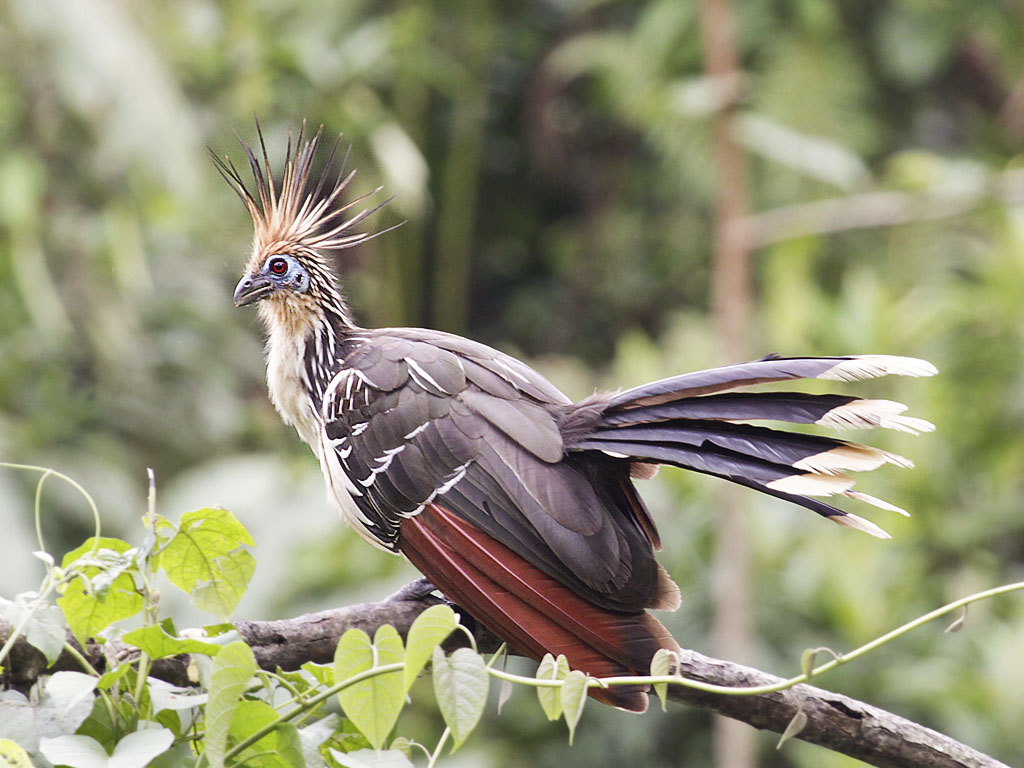
The Kaggle dataset contains 58388 training images, 2000 validation images and 2000 test images of 400 bird species. As the dataset provider Gerry mentions, this is high-quality dataset that each image has only one bird and bird’s portion of the image is more than 50%. Since Gerry had kindly done the hard work of cleaning the data, we can take a look at one image before proceeding.
img = (path/'train'/'HOATZIN').ls()[0]
PILImage.create(img)
Construct DataLoaders
The main idea is using transfer learning to build a state-of-the-art deep learning model, which is efficient and saves a lot of training time.
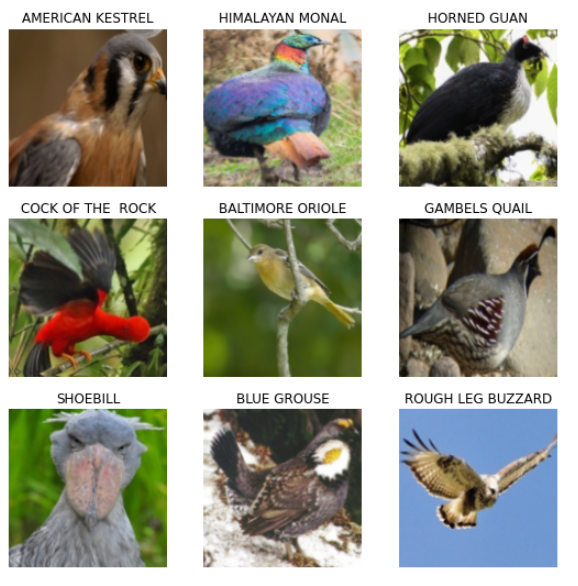
Before we start training, we need to first create dataloaders which hold our training data in batches. These batches will later be sent in sequence to GPU to train our neural network. One part we are doing differently is randomly split data into training and validation instead of using the given sets, because Gerry notes in dataset description that both given validation and test sets are hand picked as the “best” images, resulting in high evaluation scores. We will still use the given test set as unseen data for evaluation, but keep in mind test set may not be representative of real world data. Let’s take a peek at one batch in dataloaders to make sure everything is okay:
Pretrained Model with timm
timm is a wonderful library by Ross Wightman that provides state-of-the-art pretrained model for image classification. We will use one of the best models, Efficient Net, specifically “efficientnet_b3a”. For more details about timm, please refer to this repository. (timm is now integrated into fastai at the time of writing this blog post, check out timm.fast.ai)
Training
Let’s start training our model! As you know, learning rate is one of the most important hyperparameter in training neural network. Fortunately, fastai has convenient learning rate finder that gives us a sense of how changing learning rate affects losses in the model.
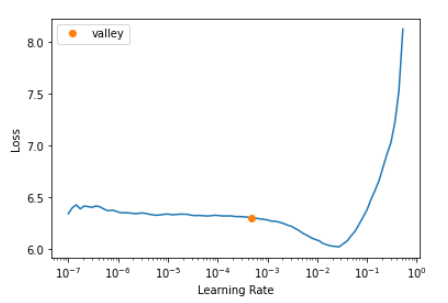
After picking a learning rate, we freeze all layers of neural net except the last one, and train 3 epochs. The last layer is created specifically for our task of classifying 400 bird species and is how we can do transfer learning. Result of training 3 epochs:
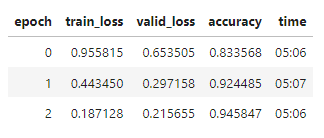
Wow! We already reached 94.5% accuracy on validation set. We can push it further by unfreezing all layers and training it more. This time, we use discriminative learning rate which gradually increases learning rates for later layers, because later layers recognize more complex pattern in images.
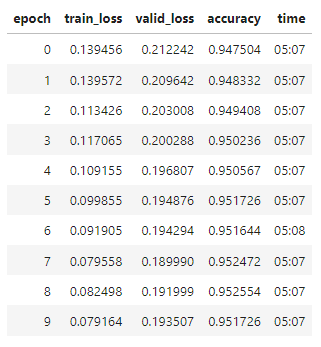
After 10 epochs, final accuracy is 95.17% on validation set. A look at the result on validation:
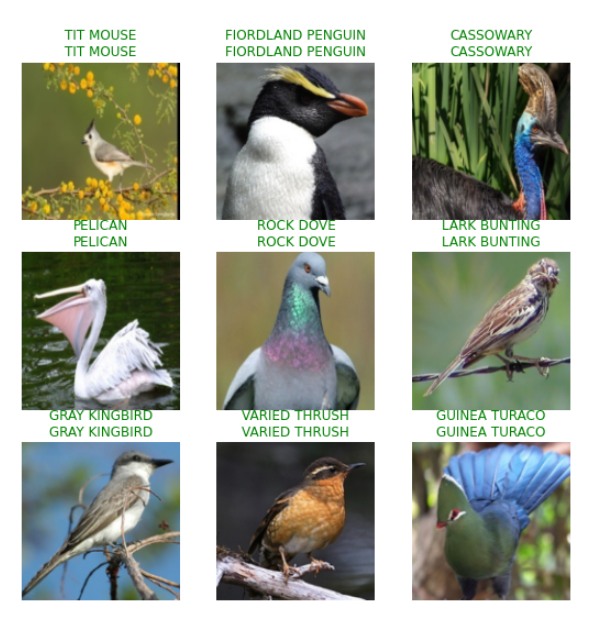
Result
Finally, we evaluate the model on test set which is given and has not been seen in the training process. The result is surprisingly 99.4% accuracy on test set of 2000 images. Please note that this score is unlikely representative of real world generalization performance as described by Gerry, Kaggle dataset provider. Still, given the high score, we have our underlying model for web app and are ready for delopyment.
Depolyment
Depolying a machine learning model is not straightforward, especially for neural net, because our model is complex and big and library dependencies are also included in server space. In our case, directly depolying to Heroku would easily exceed 500GB server image size limit. So, how do we do it? We will first depoly the model above to Azure Function and let Heroku web app make request to Azure Function.
Microsoft Azure Function
Azure Function is a severless infrastructure provided by Microsoft Azure, simplifying management tasks. Thanks to fastai tutorial and this great guide, we can leverage optimized ONNX Runtime to greatly reduce memory footprint. In fact, the model depolyment package in onnx format is 47.5MB. Azure Function’s execution is triggered by HTTP request, so we can get prediction by sending a HTTP request with image parameter. Once we test the deployment on Azure Function is working as expected, we move on to build the final web app which is what our users will see and interact with.
Heroku and Voila
Since Azure Function offloads heavy tasks of model management, we build a plain web app which can be easily hosted on Heroku. We first utilize Voila to transform a jupyter notebook into interactive page and hosting it on Heroku is straightforward.(fastai offers tutorial on this part) The mechanism under the hood works as a user uploads a bird image to the web app which then makes HTTP request with image parameter to Azure Function and gets back a prediction from the model.
Conclusion
We have built an amazing bird image classifier with an underlying deep learning model capable of recognizing 400 bird species, hosted on Azure Function and Heroku. Anyone can go to this web app in a browser and get prediction from the model without any prerequisites. Try it out here.
Thanks for reading! For more details about this project, here is my repo.
Improvement
As my first project with fastai, I am happy that it’s up and running. However, I become aware of tons of room for improvement.
- Before training neural network, I should explore and experiment the dataset, which helps to get insights on techniques to improve performance, such as data augmentation.
- Training with the full dataset easily takes more than 30 minutes, so subsetting the dataset and work with the representative sample is a great way to experiment and test models.
- Having a baseline model is critical in machine learning project workflow, because it helps to spot problems early on and also serves as a benchmark.
- I could spend more time exploring other architectures than tuning hypterparaters on the model.
There are a lot more than I could mention here, including a different deployment. I will have these in mind on my next project.